
What players say
Friendly Ghost Match Puzzle offers a stress-free puzzle experience that is perfect for casual gamers. The bright, smiling ghost icons create a welcoming atmosphere, and the simple swap-and-match mechanics are intuitive from the first move. The game rewards careful planning without punishing mistakes too harshly, making it ideal for both children and adults. Its browser-based nature means no setup or downloads, so you can jump into a game anytime. While the core loop is familiar, the gentle progression and cheerful presentation keep it engaging for short sessions or longer play.
About this game
Core Gameplay Loop
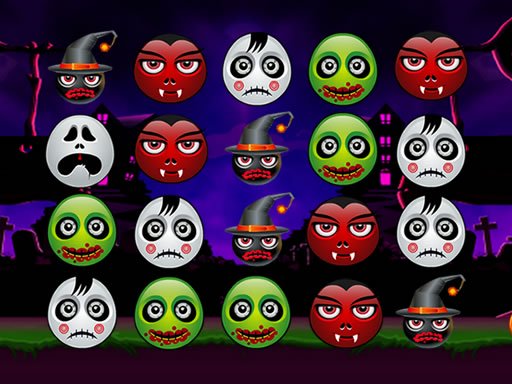
At its heart, Friendly Ghost Match Puzzle is about pattern recognition and planning. Players examine a grid filled with colorful ghost icons, each with a distinct design. The goal is to swap two adjacent icons so that three or more identical ones line up horizontally or vertically. When a match occurs, those icons vanish, and new ones cascade down from above. This can trigger chain reactions, where subsequent matches happen automatically, clearing larger sections of the board. The game continues until no more valid moves remain. This simple loop is easy to pick up but offers depth as players learn to anticipate cascades and optimize their moves.
Visual Style and Atmosphere
The game adopts a playful Halloween theme without any frightening elements. Ghost icons are depicted in bright, cheerful colors with smiling faces. The board itself has a clean, uncluttered design, making it easy to distinguish different icons at a glance. Background colors shift gently, adding a subtle sense of motion. The overall aesthetic is warm and inviting, appealing to both children and adults. There are no dark or scary visuals, ensuring a comfortable experience for players of all ages. The cheerful presentation helps maintain a relaxed mood throughout play.
Accessibility and Convenience
Friendly Ghost Match Puzzle runs entirely in a web browser, so there is no need to download or install any software. It works on desktop computers, tablets, and smartphones with a modern browser. The controls are simple: click or tap an icon to select it, then click or tap an adjacent icon to swap them. This intuitive interface means players can start a game in seconds. The game is free to play with no hidden costs or in-app purchases, making it an accessible choice for anyone looking for a quick mental break.
Progression and Challenge
While the core rules remain constant, the game may introduce increasing difficulty as players advance. Early boards are relatively open, with plenty of matching opportunities. Later stages might feature more crowded grids or a wider variety of icon types, requiring more careful planning. Some versions of this type of game include a scoring system that rewards longer chains and efficient board clearing. Players who enjoy setting personal records can strive to improve their scores over multiple sessions. The steady increase in complexity keeps the experience engaging without becoming overwhelming.
Strategic Thinking
Success in Friendly Ghost Match Puzzle depends on looking ahead. Rather than making the first obvious match, effective players scan the entire board for moves that will set up future cascades. Focusing on clusters of identical icons can create more space and open up new matching possibilities. It is often beneficial to clear icons near the bottom of the grid, as this can cause larger shifts in the board layout. Patience is a valuable asset; rushing can lead to missed opportunities. The game rewards thoughtful, deliberate play over speed.


Player comments
Sign in to comment
You must be logged in before posting a review or rating.
No account? Create one
No comments yet. Be the first to comment!